
How We Cut Legal Document Processing Time by 73%: A Law Firm Automation Case Study
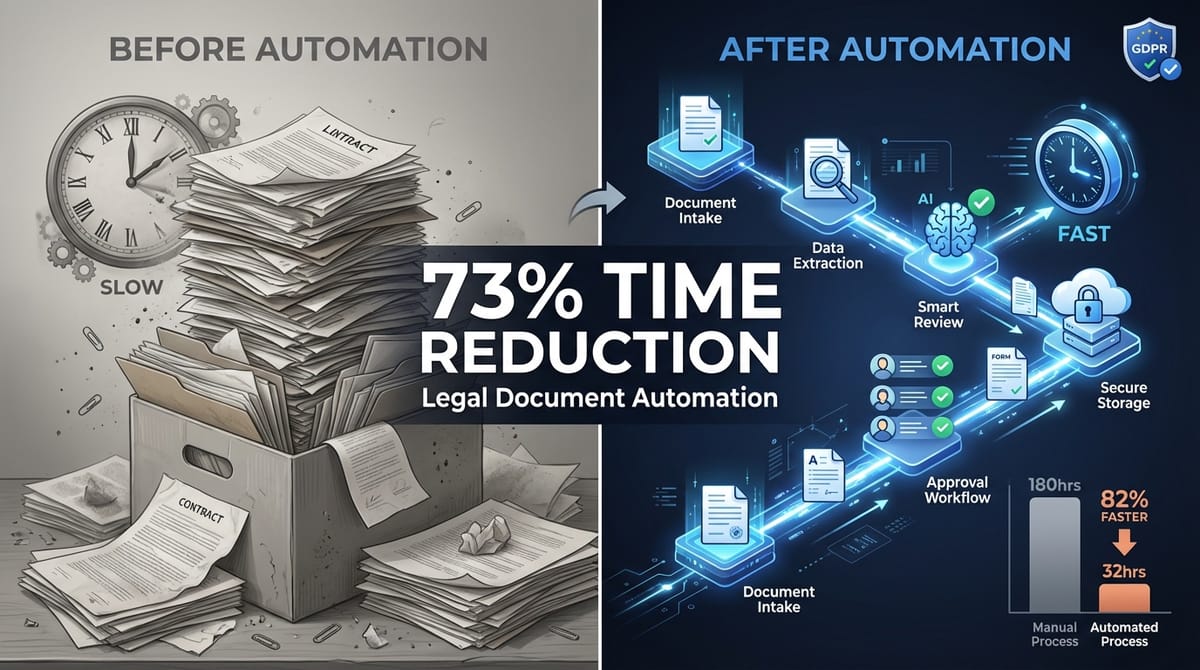
A mid-sized European law firm was drowning in documents. Partners spent 15-20 hours per week on admin tasks that should take minutes. Client updates slipped through cracks. GDPR compliance meant constant manual audits. They needed to scale without hiring three more paralegals.
We built them a compliant automation system that cut document processing time by 73%. Here's exactly what we did and what it cost them.
The Before State: Where Time Disappeared
The firm handled 200+ client matters simultaneously. Here's what their document workflow looked like:
Intake process — Client emails document → Paralegal downloads → Saves to network drive → Manually renames with case number → Updates tracking spreadsheet → Sends confirmation email. Average time: 8 minutes per document. 50-60 documents daily.
Classification — Monthly review of all documents → Manual tagging by document type → Moving to correct folder structure → Updating case management system. 12 hours per month.
Client communication — Manual status update emails → Scheduling follow-ups in calendar → Chasing clients for missing documents → Sending appointment confirmations. 6-8 hours per week per paralegal.
Compliance tracking — Quarterly GDPR audits → Checking consent forms → Verifying data retention → Manual deletion of expired documents. 20 hours per quarter.
Total admin time per month: approximately 180 hours across three paralegals. At €35/hour fully loaded cost, that's €6,300 monthly just on document handling.
The real cost was hidden in delays. Documents sat unprocessed for 24-48 hours. Clients waited 3-4 days for routine updates. Partners couldn't find files quickly during client calls.
Document Processing Automation: The Core System
We built the automation on n8n (open-source workflow tool) integrated with their existing case management system and storage. The key was keeping their familiar tools while eliminating the manual steps.
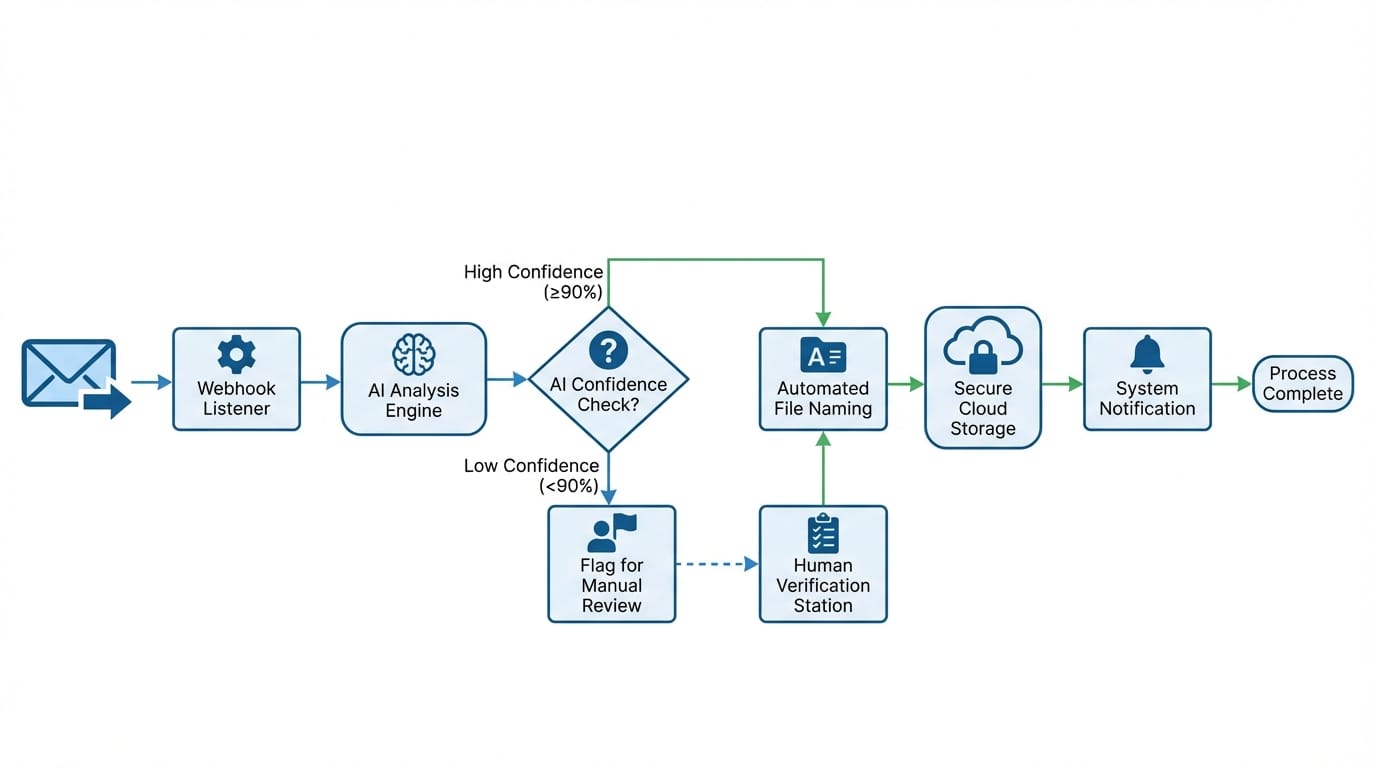
Intake automation — Email webhook receives client documents → Extracts sender, subject, attachments → Uses GPT-4 to identify case number from email content → Automatically names file with standard convention → Uploads to correct case folder in network storage → Logs in case management system → Sends templated confirmation to client. Average time: 45 seconds per document.
We trained the AI on their existing naming conventions. It handles 94% of documents without human review. The 6% that need manual review are flagged with specific reasons (ambiguous case reference, multiple cases mentioned, unknown sender).
Smart classification — Every uploaded document triggers classification workflow → AI analyzes content and filename → Assigns document type from their 23-category taxonomy → Applies metadata tags → Moves to subfolder structure → Updates case timeline. Runs automatically every 2 hours.
The classification model learned from 3,000 historical documents. Accuracy after tuning: 91%. When uncertain (confidence below 85%), it flags for human review with suggested categories.
Version control — Automatically detects duplicate filenames → Compares file hashes → Either skips duplicate or creates new version with timestamp → Maintains version history → Notifies relevant lawyer of update.
This solved their "document_final_v3_actually_final.pdf" problem. Every version is tracked with clear timestamps and editor information.
Client Communication Automation
The document system freed up time. The communication automation gave hours back to lawyers.
Status updates — Case milestones trigger automatic email templates → Personalized with case details and next steps → Includes relevant documents as attachments → Logs communication in case file → Schedules follow-up if no response in 5 days.
We identified 12 standard milestone types (case opened, documents received, court date scheduled, etc.). Each has a template. Lawyers can customize before sending or approve automatic sending for routine updates.
Appointment scheduling — Client clicks booking link in email → Sees lawyer's actual calendar availability (synced from Google Calendar) → Selects time → Automatic confirmation email to both parties → Calendar event created → Reminder emails 24 hours before → Zoom link generated for virtual meetings.
Integrated with their existing Google Workspace. No new tools for lawyers to learn. Reduced scheduling back-and-forth from average 4.2 emails to zero.
Document requests — Automated emails when specific documents are needed → Tracks which clients responded → Sends polite reminders after 3 days and 7 days → Escalates to paralegal if no response after 10 days → Updates case status automatically when documents received.
Before automation, chasing missing documents consumed 4-5 hours per week. Now it happens automatically with escalation only when truly needed.
GDPR Compliance: The Non-Negotiable Requirement
Legal sector automation must be compliance-first. We couldn't optimize their way into regulatory violations.
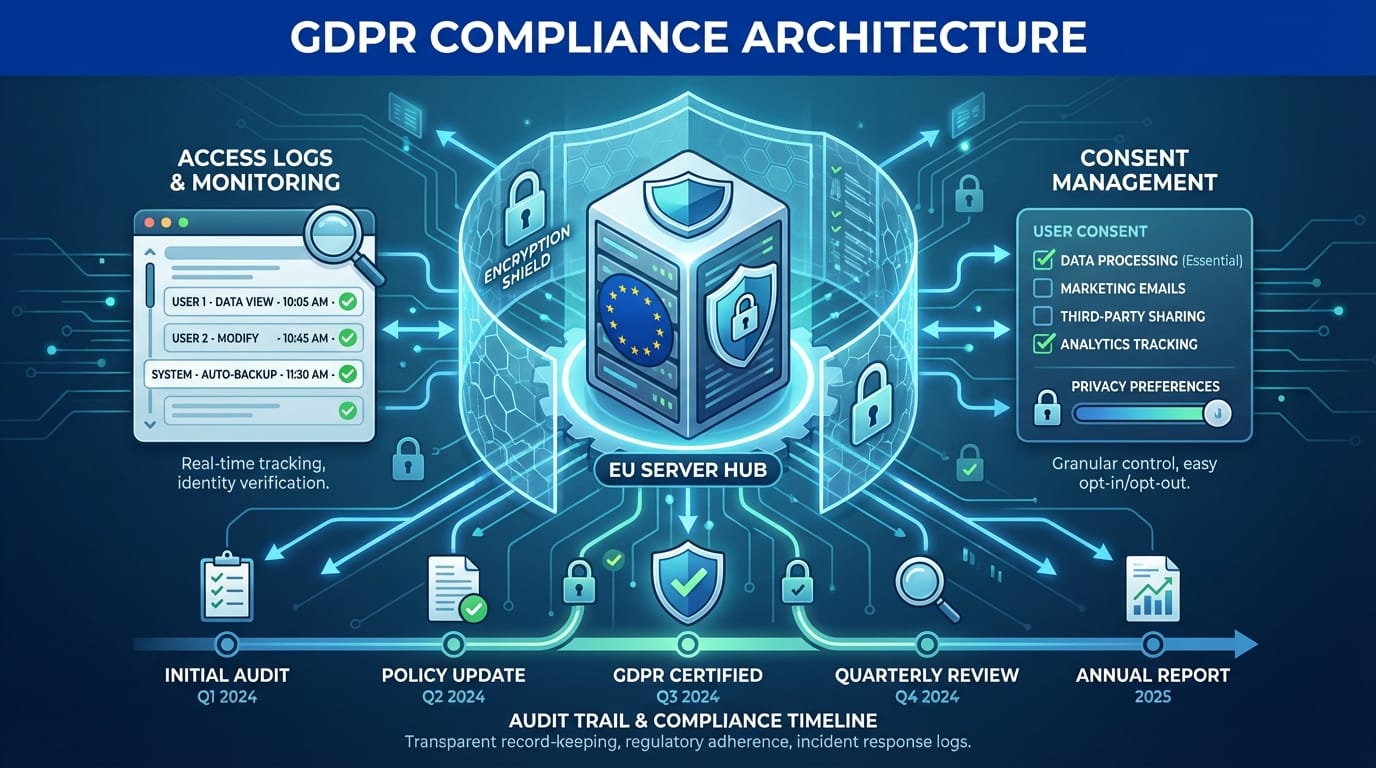
Data handling architecture — All documents stored in EU-based servers (Hetzner in Germany) → End-to-end encryption for documents in transit and at rest → Access logs for every document view, download, or modification → Role-based access control integrated with their Active Directory → No document content sent to external APIs without explicit encryption.
When we use GPT-4 for classification or extraction, we send only non-sensitive metadata (filenames, basic structure) or use Azure OpenAI Service with GDPR-compliant data processing agreement. Actual case details stay local.
Consent management — Client onboarding workflow requires explicit consent checkboxes → Consent stored with timestamp and IP → Each consent type tracked separately (document processing, automated communications, data retention) → Consent dashboard shows status for every client → Withdrawal process automated (client portal or email) → Automatic data deletion workflow triggered on consent withdrawal.
This was the trickiest part. GDPR requires granular consent. We built a system where clients can consent to document automation but not automated emails, or vice versa. The workflows check consent status before executing.
Audit trails — Every automation action logged with timestamp, triggering event, documents affected, and outcome → Logs stored separately from case data with 7-year retention → Monthly automated GDPR compliance reports → Identifies documents past retention period → Flags cases with expired consent → Lists all data processing activities for each client.
The quarterly GDPR audit that took 20 hours now takes 90 minutes. The system generates the report automatically. The paralegal reviews and handles exceptions.
Data retention automation — Each document type has defined retention period → System calculates deletion date on upload → Scheduled check runs weekly → Moves expired documents to quarantine folder → Sends notification to responsible lawyer → After 30-day review period, permanently deletes → Deletion logged in audit trail.
Lawyers can extend retention periods when needed (active litigation, ongoing matters). But the default is automatic compliance.
The ROI Breakdown: What Actually Changed
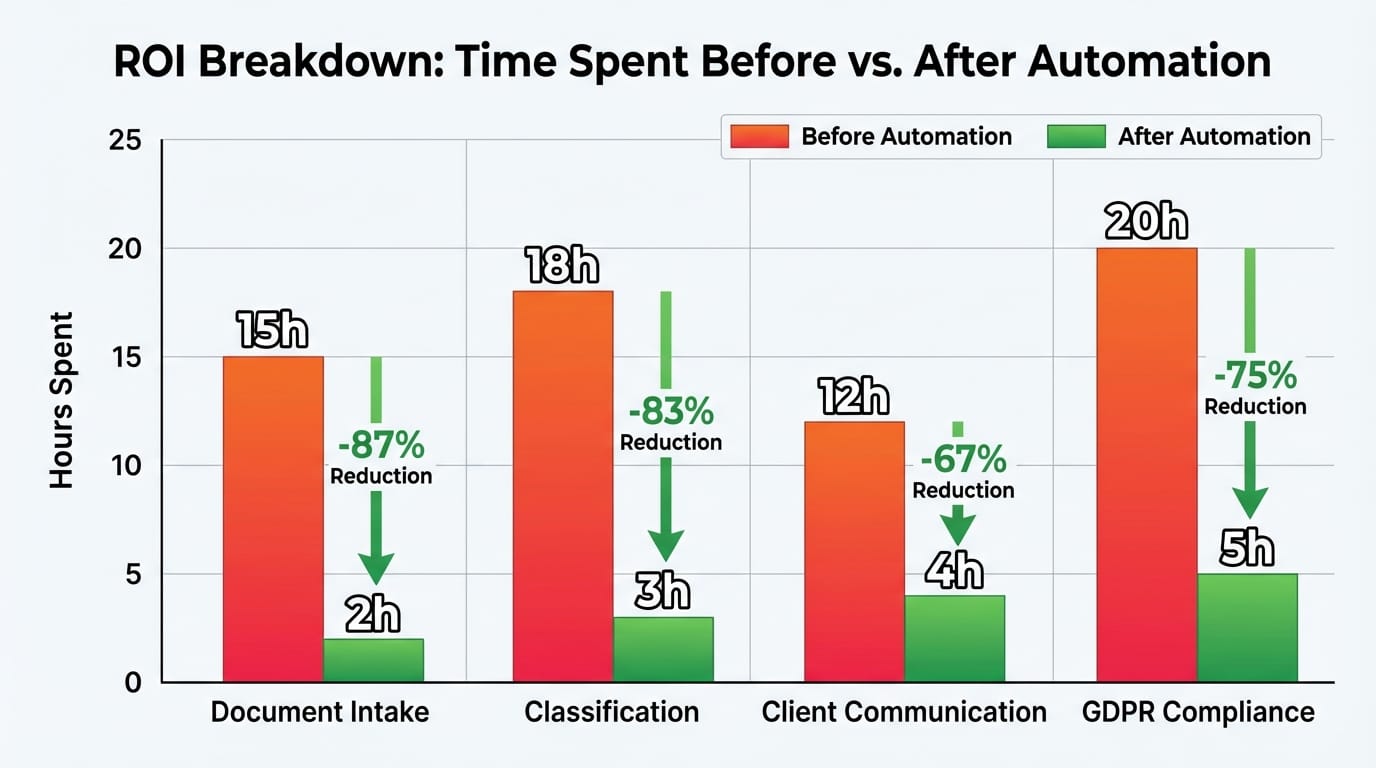
We tracked metrics for six months post-implementation. Here's what happened:
Time saved per month — Document intake: 60 documents/day × 7.25 minutes saved × 20 working days = 145 hours → Classification: from 12 hours to 1.5 hours (88% reduction) → Client communication: from 32 hours to 9 hours (72% reduction) → GDPR compliance: from 6.7 hours to 1.5 hours (78% reduction) → Total: 178.7 hours saved monthly.
At €35/hour fully loaded cost: €6,254 saved per month, €75,048 annually.
Cost per automated task — Development cost: €18,500 (one-time) → Monthly hosting and API costs: €180 → Monthly maintenance (our retainer): €400 → First-year total cost: €25,460.
Payback period: 4.1 months. After that, pure savings.
Error rate changes — Document misfiling: from 3.2% to 0.4% → Missed client communications: from 8-10 per month to 1-2 → GDPR compliance gaps: from 6 identified in quarterly audit to 0.
The error reduction is arguably more valuable than time savings. Misfiled documents cost hours to locate. Missed communications damage client relationships.
Capacity increase — The firm took on 40% more client matters in the six months after automation without adding headcount. The paralegals shifted from admin work to actual paralegal work (research, case preparation, client calls).
Partners report they can find any document within 30 seconds. Client satisfaction scores increased by 18 points (they survey after case closure).
What we didn't automate — Legal research, client consultations, court appearances, strategy decisions. Automation handled the predictable, repetitive work. Humans do the judgment calls.
This is the pattern we see across professional services. The opportunity isn't replacing people. It's removing the tedious work so people can do what they're actually trained for.
Lessons for Other Professional Services
What applies beyond this specific law firm:
Start with document workflows — Almost every professional service has a document problem. Intake, classification, storage, retrieval. Get this right first. It's high-volume, rule-based, and painful when manual.
Compliance isn't optional — If you handle sensitive data (client information, medical records, financial data), build compliance into the automation from day one. Retrofitting is expensive and risky. Know your regulatory requirements before designing workflows.
Use existing tools — We didn't make them switch case management systems or abandon their Google Workspace. The automation connected what they already used. Change management is harder than technical implementation.
Flag, don't fully automate — The 85% confidence threshold for auto-classification wasn't arbitrary. It's where accuracy meets acceptable review burden. Full automation with 91% accuracy means 9% errors compounding. Flag-for-review with 91% accuracy means catching issues before they matter.
Measure actual time, not estimated time — We logged real task durations for two weeks before building anything. People underestimate how long repetitive tasks take because each instance is short. The aggregate is massive.
We've helped teams in accounting, consulting, and medical practices with similar patterns. The specifics change. The principles don't.
What This Means for Your Service Business
If your team spends more than 10 hours per week on document handling, client updates, or compliance tracking, automation probably makes financial sense.
The questions to ask:
- Which tasks happen more than 50 times per month?
- Which tasks follow predictable rules (if X, then Y)?
- Which tasks delay the real work your clients pay for?
- What compliance requirements can't be compromised?
If you have clear answers, you likely have a viable automation project.
We're offering free automation assessments for professional services businesses. We'll look at your workflows and give you specific time and cost projections. No obligation, no sales pitch. Just honest evaluation.