
When Flutter Plugins Aren't Enough: Building a Real-Time Guitar Tuner with Native Audio Processing
Most Flutter plugins work fine. Until they don't. When you're building something that needs to process audio in real-time—like a guitar tuner that must detect pitch within 10-15 milliseconds—you'll hit walls that no amount of Dart optimization can fix.
We learned this the hard way at Etere Studio while building a chromatic tuner app. What started as "just use a Flutter audio plugin" turned into a deep dive into platform channels, native audio APIs, and some genuinely frustrating debugging sessions. Here's what we discovered about flutter native integration when milliseconds actually matter.
Why Standard Flutter Plugins Break Down for Audio
Flutter's plugin ecosystem is impressive. For most features—camera, maps, payments—you can find a plugin that works. But real-time audio processing has constraints that don't play well with the standard plugin architecture.
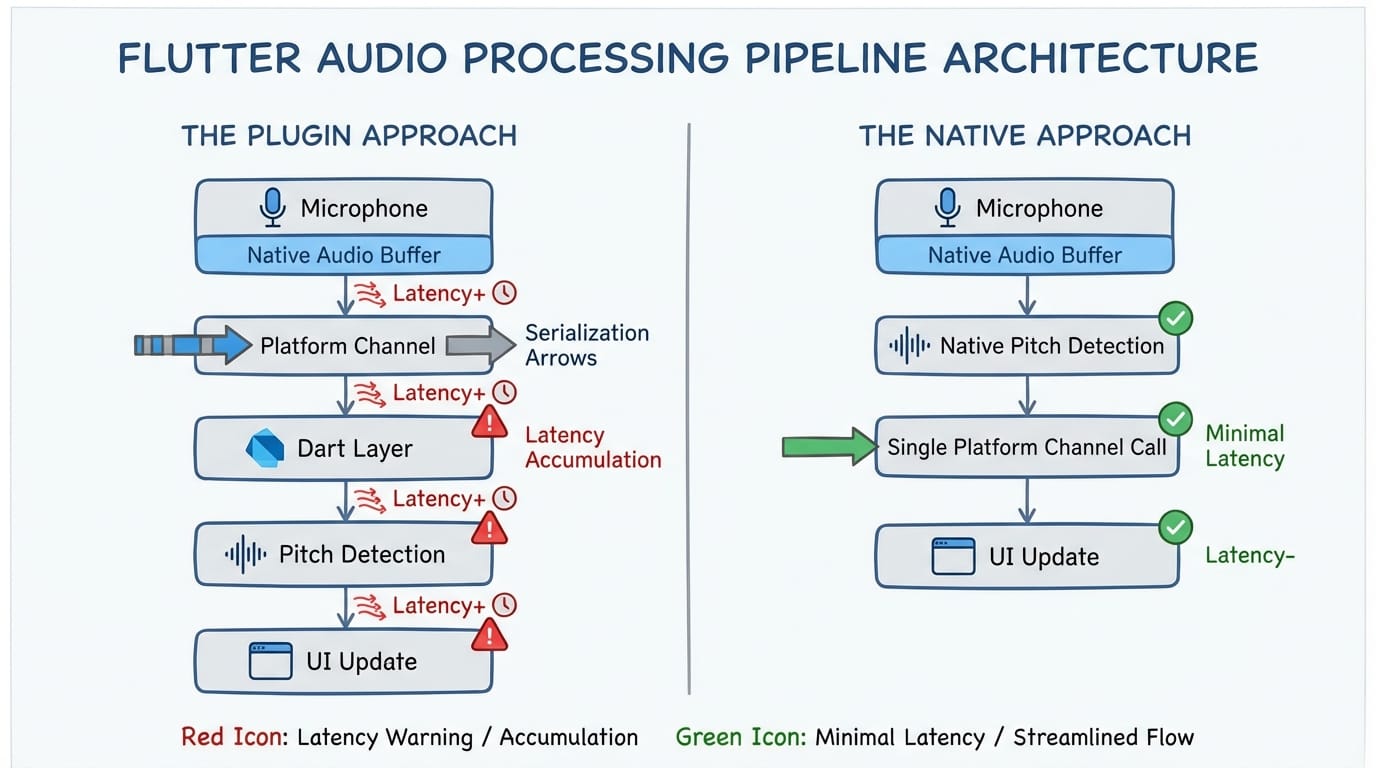
The core issue: latency accumulates at every layer. A guitar string vibrates. The microphone captures it. The audio buffer fills. That data crosses from native code to Dart through platform channels. Your pitch detection algorithm runs. The UI updates. Each step adds milliseconds.
For a guitar tuner to feel responsive, the entire pipeline—from pluck to on-screen needle movement—needs to complete in under 50ms. Human perception of "instant" is surprisingly tight. Go above 100ms and the tuner feels sluggish. Above 200ms and it's unusable.
Here's where the math gets uncomfortable:
- Audio buffer latency: 5-20ms (depending on buffer size)
- Platform channel round-trip: 0.5-2ms per call
- Dart garbage collection pause: 0-10ms (unpredictable)
- UI frame time: 16ms (at 60fps)
If you're making multiple platform channel calls per audio frame, serializing data, and triggering GC, you can easily blow past your latency budget before the pitch detection algorithm even runs.
The Platform Channel Reality Check
Platform channels are how Flutter talks to native code. They work through message passing—you serialize data on one side, send it across the channel, and deserialize on the other side. For most use cases, this overhead is negligible.
But for real-time audio? It's a problem.
The serialization step is the killer. StandardMethodCodec needs to encode your audio samples into a format that can cross the Dart-native boundary. If you're sending raw PCM data—say, 1024 samples at 44.1kHz—you're looking at roughly 4KB of data per buffer. That's not huge, but the encoding/decoding overhead adds up when you're doing it 40+ times per second.
We measured platform channel latency in our tuner project:
- Empty method call (no data): ~0.3ms
- Small payload (100 bytes): ~0.5ms
- Audio buffer (4KB): ~1.2ms
- Large payload (14KB): ~2.5ms
These numbers might seem small, but they're per call. And they're averages. The variance matters too—occasional spikes to 5-10ms will cause audible glitches.
The threading model adds another wrinkle. Platform channel messages must be sent on the platform thread. Audio callbacks typically fire on a dedicated audio thread. So you need to marshal data between threads, which adds synchronization overhead and potential for blocking.
Going Native: The Architecture That Actually Works
After burning a week trying to make a plugin-based approach work, we accepted reality: the pitch detection had to run entirely in native code. Flutter would only receive the results—a single float representing the detected frequency.
This changed everything. Instead of streaming audio buffers across the platform channel, we sent one small message per UI update. The data flow became:
- Native audio callback captures samples (audio thread)
- Native pitch detection processes samples (audio thread)
- Result posted to main thread
- Single platform channel call sends frequency to Dart
- Flutter updates UI
The native layer handles all the performance-critical work. Flutter does what it's good at: rendering a smooth UI.
iOS: Core Audio and the Audio Unit Path
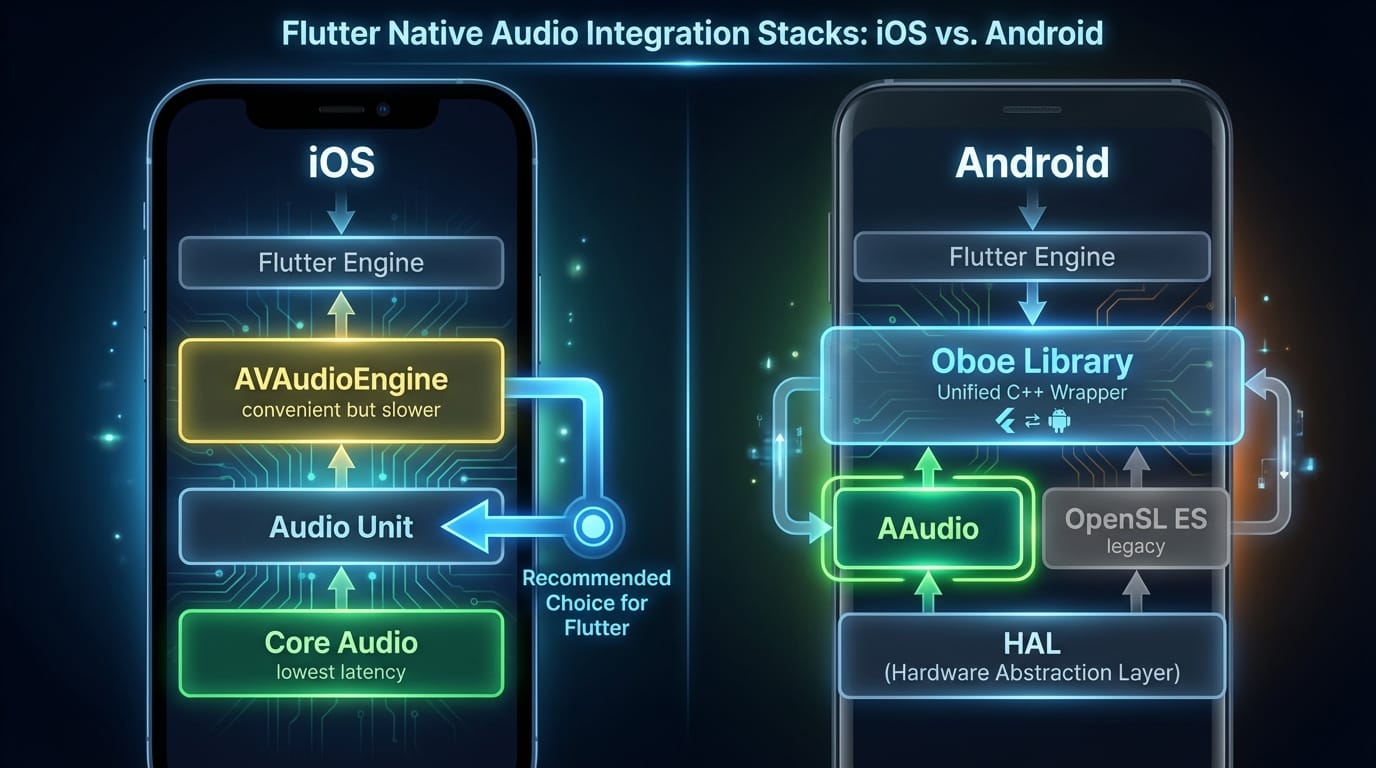
On iOS, we used Audio Unit for capture. Not AVAudioEngine—it adds too much latency for our use case. The Audio Unit API is older and more verbose, but it gives you direct access to the audio hardware with minimal buffering.
Key settings that matter:
- Buffer size: 256 samples (about 5.8ms at 44.1kHz)
- Sample rate: 44100 Hz
- Format: 32-bit float, mono
Smaller buffers mean lower latency but higher CPU load (more callbacks per second). We found 256 samples to be the sweet spot—low enough latency to feel responsive, high enough to avoid audio dropouts on older devices.
For pitch detection, we implemented a YIN algorithm variant. It's computationally efficient and handles the harmonic complexity of guitar strings well. The entire detection runs in the audio callback, which is risky—you can't do anything that might block—but necessary for minimum latency.
Android: Oboe and the AAudio Journey
Android audio has historically been a mess. Latency varied wildly between devices, and the APIs were fragmented. Google's Oboe library fixes most of this by providing a unified C++ API that automatically uses AAudio on Android 8.1+ and falls back to OpenSL ES on older devices.
Oboe makes low-latency audio achievable, but you still need to configure it correctly:
oboe::AudioStreamBuilder builder;
builder.setDirection(oboe::Direction::Input)
       ->setPerformanceMode(oboe::PerformanceMode::LowLatency)
       ->setSharingMode(oboe::SharingMode::Exclusive)
       ->setFormat(oboe::AudioFormat::Float)
       ->setChannelCount(1)
       ->setSampleRate(44100)
       ->setFramesPerBuffer(256);
The Exclusive sharing mode is crucial. It gives your app direct access to the audio hardware instead of going through Android's audio mixer. The trade-off: other apps can't use audio simultaneously. For a tuner, that's acceptable.
One gotcha we hit: not all Android devices support low-latency mode. Oboe will silently fall back to a higher-latency configuration if the hardware doesn't support your request. Always check stream->getPerformanceMode() after opening to verify you got what you asked for.
Production War Stories: What Actually Went Wrong
Theory is nice. Here's what actually broke in production.
The Garbage Collection Surprise
Our first beta had a maddening bug: the tuner would work perfectly for 30-40 seconds, then the needle would stutter. The pitch detection was fine—we could see correct values in the logs. But the UI would freeze for 50-100ms at random intervals.
The culprit: Dart garbage collection. We were creating new Float64List objects for each audio frame, which generated enough garbage to trigger collection pauses. The fix was embarrassingly simple—reuse a single buffer instead of allocating new ones.
Lesson learned: in performance-critical paths, object allocation is the enemy. This is true in most languages, but Dart's GC behavior makes it especially important.
The Android Device Lottery
We tested on a Pixel 6 and a Samsung Galaxy S21. Both worked great. Then we got bug reports from users with budget phones—the tuner was detecting pitches a quarter-tone flat.
The problem: some devices report incorrect sample rates. They claim to capture at 44100 Hz but actually capture at 48000 Hz (or vice versa). Our pitch detection math assumed the reported rate was accurate.
The fix: we added a calibration step that plays a known tone through the speaker and measures what the microphone captures. Not elegant, but it catches sample rate mismatches.
The Mysterious Audio Glitches
On certain iOS devices, we'd get periodic clicking sounds—brief audio dropouts that made the tuner unusable. The pattern was consistent: exactly every 2 seconds.
After way too much debugging, we found the cause: a background timer we'd set up for analytics was firing on the audio thread. The timer callback took only 1-2ms, but that was enough to cause buffer underruns.
Rule: never do anything on the audio thread except audio processing. No logging, no analytics, no network calls. Nothing that might allocate memory or touch the disk.
When to Go Native vs. When to Stay in Dart
Not every feature needs native code. Here's how we think about the decision at Etere Studio:
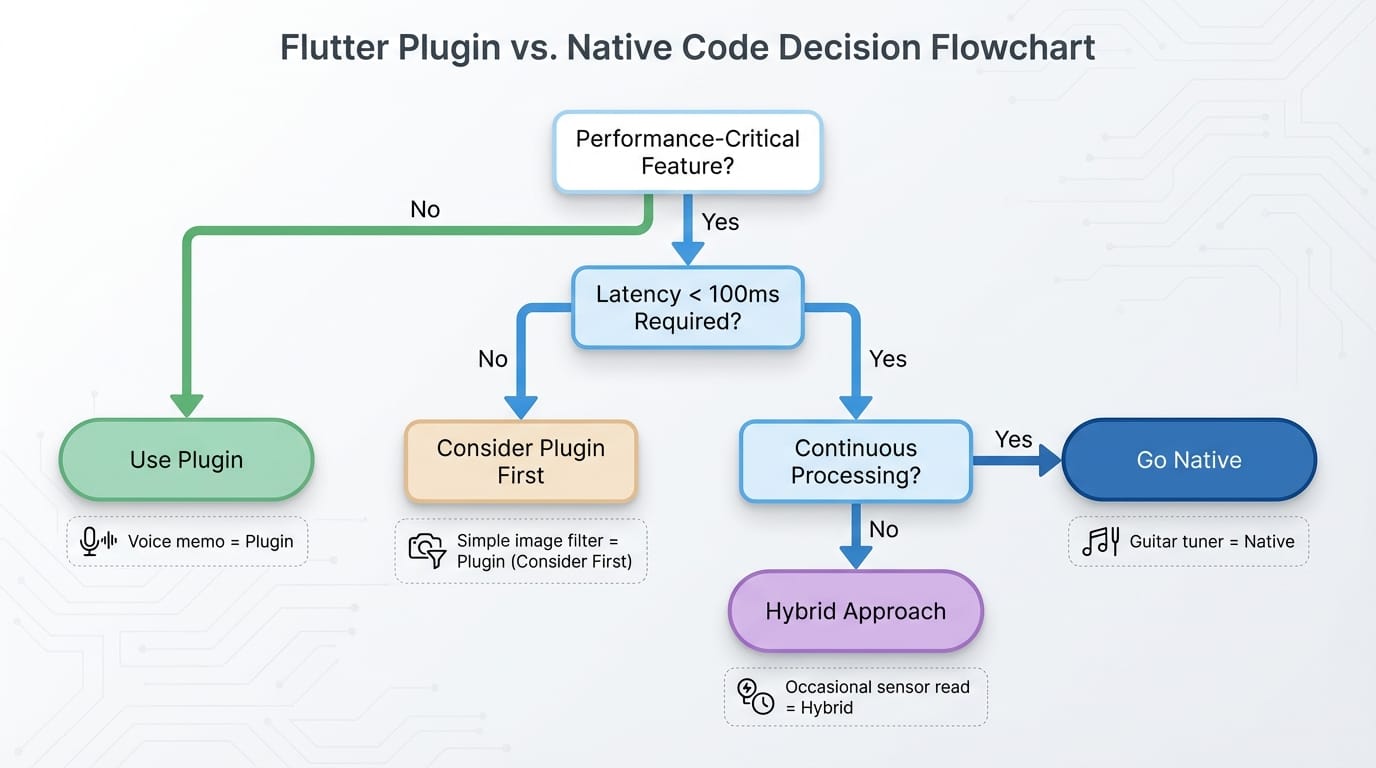
Stay in Dart when:
- Latency requirements are relaxed (>100ms is fine)
- You're doing occasional operations, not continuous processing
- A well-maintained plugin exists and meets your needs
- Development speed matters more than raw performance
Go native when:
- Real-time processing with strict latency requirements
- Continuous high-frequency operations (audio, video, sensors)
- You need APIs that no plugin exposes
- Platform-specific optimizations are critical
Consider a hybrid approach when:
- Most of your app is standard Flutter, but one feature needs native performance
- You can isolate the performance-critical code into a clean module
- You have the expertise (or budget) to maintain native code on both platforms
The guitar tuner was clearly in "go native" territory. But we've built plenty of apps where plugins worked fine. A voice memo app with basic recording? Plugin. A podcast player? Plugin. A real-time audio effects processor? Native.
The Trade-offs Nobody Talks About
Going native isn't free. Here's what it actually costs:
Development time: Our native audio module took 3 weeks to build and test. A plugin-based approach would have taken 3 days (and then failed in production, but still).
Maintenance burden: You now have three codebases—Dart, Swift/ObjC, and Kotlin/Java (or C++ if you're using NDK). Bugs can hide in any of them. Platform updates can break things.
Team skills: Not every Flutter developer knows Core Audio or Oboe. You might need to hire specialists or spend time learning unfamiliar APIs.
Testing complexity: Native code needs native tests. You can't just run flutter test and call it a day.
For the tuner project, these trade-offs were worth it. The app needed to work reliably, and there was no plugin-based path to that goal. But we've also talked clients out of native approaches when the complexity wasn't justified.
Practical Takeaways
If you're building something with real-time audio requirements in Flutter:
- Measure first. Profile your latency budget before writing code. Know exactly how many milliseconds you have to work with.
- Minimize channel crossings. Every platform channel call has overhead. Do as much processing as possible on the native side and send only results to Dart.
- Use the right native APIs. On iOS, Audio Unit beats AVAudioEngine for latency. On Android, Oboe with AAudio is the path forward.
- Watch your allocations. Both in native code and Dart, avoid creating objects in hot paths. Reuse buffers.
- Test on bad devices. Your development phone is probably faster than your users' phones. Test on old and budget hardware.
- Expect platform quirks. Audio behavior varies wildly across devices. Build in calibration and fallbacks.
Flutter native integration isn't something you do for fun—it's something you do when you've exhausted the alternatives. But when you need it, knowing how to drop down to native code is what separates apps that work from apps that ship.
Building something with demanding performance requirements? We've been through the native integration trenches and can help you figure out the right approach. Let's talk