
Flutter Clean Architecture: A Practical Guide to Project Organization
Clean architecture in Flutter is one of those topics where everyone has an opinion, but few explain when you actually need it. Here's the short answer: if you're building an MVP or a small app with 2-3 developers, you probably don't. But if you're working on something with complex business logic, multiple data sources, or a team that needs to work in parallel — it's worth the setup cost.
At Etere Studio, we've shipped Flutter apps using both approaches. Some projects needed the full clean architecture treatment. Others worked better with a simpler feature-first structure. The difference wasn't about "doing it right" — it was about matching the architecture to the actual problem.
This guide covers the practical side: what the layers actually do, how we organize our folders, and most importantly, how to decide if you need this at all.
The Three Layers, Without the Theory
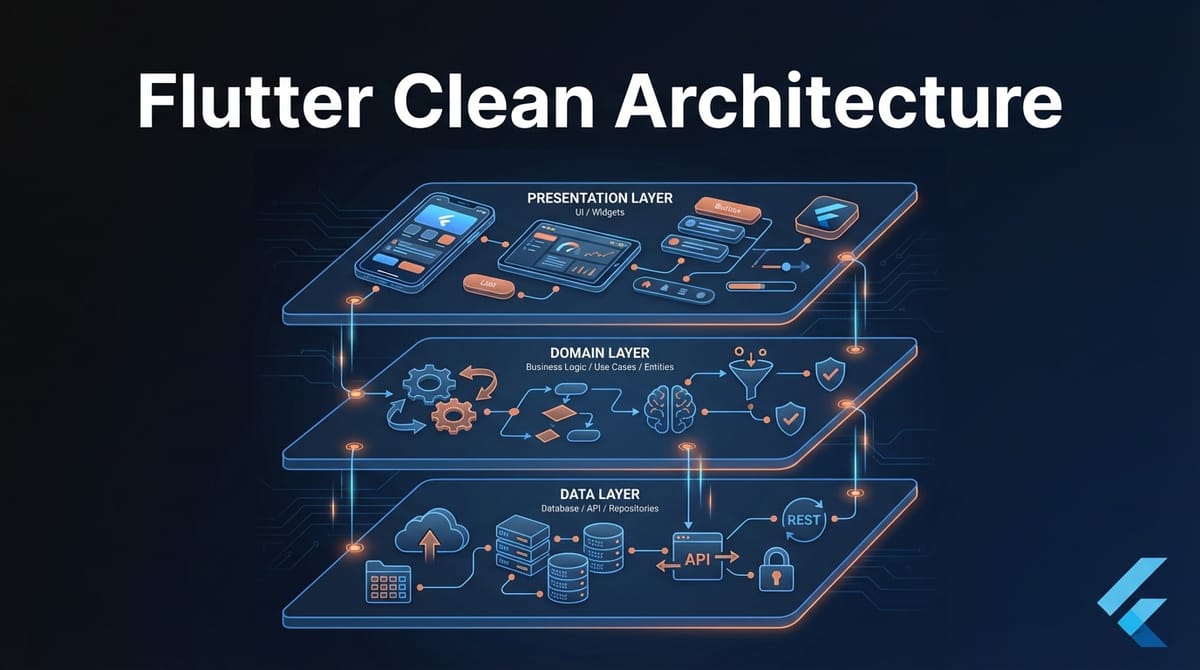
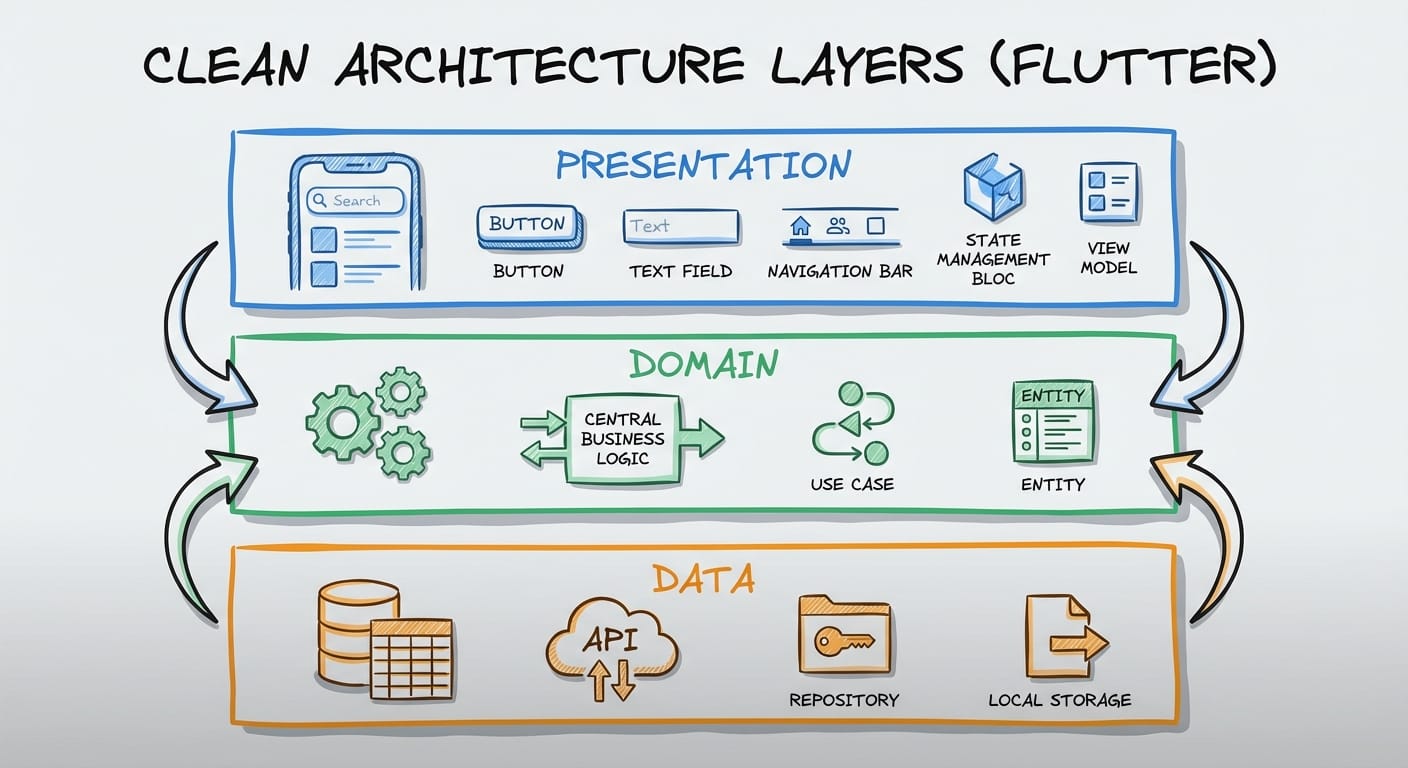
Clean architecture in Flutter typically splits into three layers: presentation, domain, and data. You've probably seen diagrams with circles and arrows. Let's skip that and look at what each layer actually does.
Presentation layer — Your UI code. Widgets, screens, state management (BLoC, Riverpod, whatever you use). This layer knows how to display things and handle user interactions. It doesn't know where data comes from.
Domain layer — Your business logic. Use cases, entities, repository interfaces. This is the "what should happen" without caring about "how." If your app has rules like "users can only book 3 appointments per day" — that logic lives here.
Data layer — Where things actually happen. API calls, database operations, caching. Repository implementations, data sources, models that map to/from JSON. This layer knows the messy details.
The key insight: dependencies point inward. Presentation depends on domain. Data depends on domain. Domain depends on nothing. This means you can swap your API implementation without touching business logic, or redesign your UI without breaking your data layer.
Our Actual Folder Structure
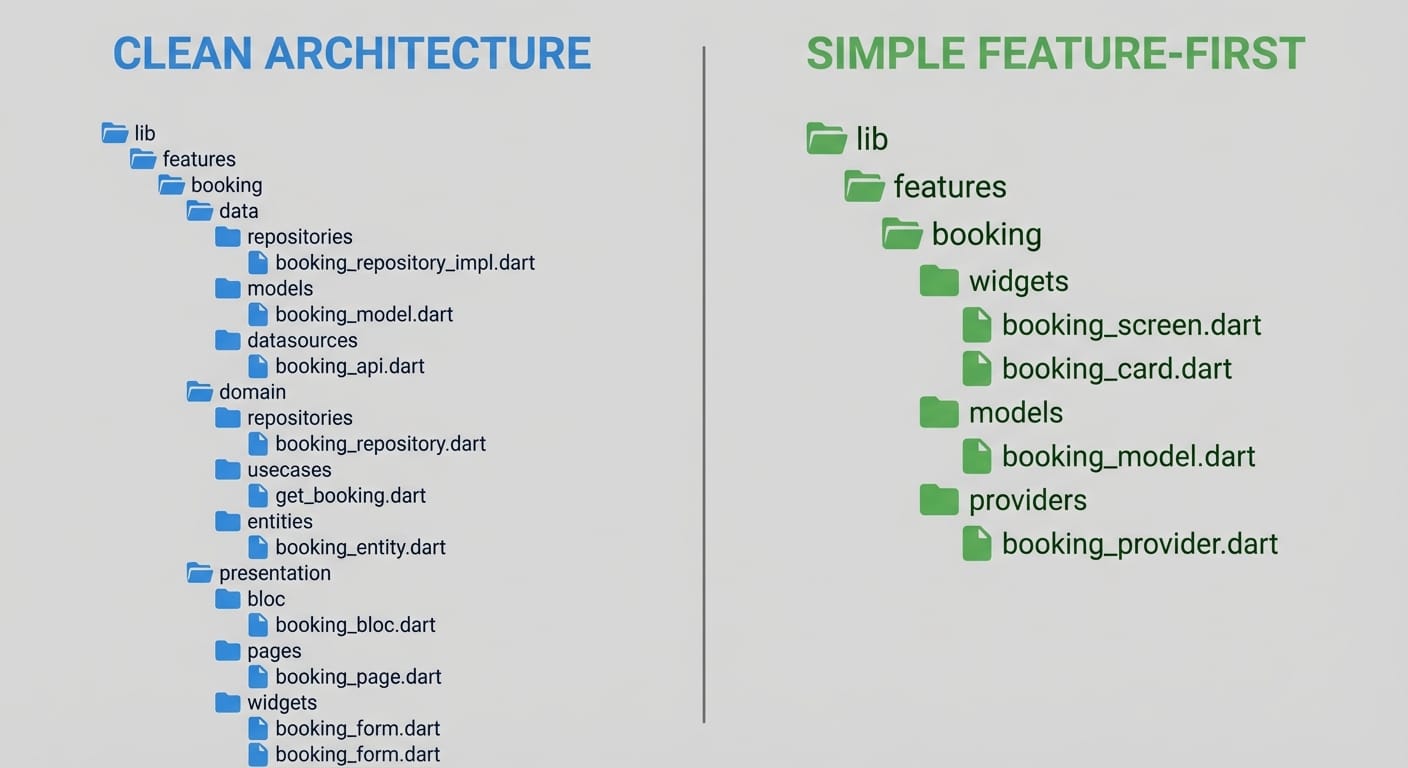
Here's how we organize a Flutter project using clean architecture. This isn't theoretical — it's what we use on production apps.
lib/
├── core/
│   ├── error/
│   │   ├── exceptions.dart
│   │   └── failures.dart
│   ├── network/
│   │   └── network_info.dart
│   └── usecases/
│       └── usecase.dart
├── features/
│   └── booking/
│       ├── data/
│       │   ├── datasources/
│       │   │   ├── booking_remote_datasource.dart
│       │   │   └── booking_local_datasource.dart
│       │   ├── models/
│       │   │   └── booking_model.dart
│       │   └── repositories/
│       │       └── booking_repository_impl.dart
│       ├── domain/
│       │   ├── entities/
│       │   │   └── booking.dart
│       │   ├── repositories/
│       │   │   └── booking_repository.dart
│       │   └── usecases/
│       │       ├── create_booking.dart
│       │       └── get_user_bookings.dart
│       └── presentation/
│           ├── bloc/
│           │   ├── booking_bloc.dart
│           │   ├── booking_event.dart
│           │   └── booking_state.dart
│           ├── pages/
│           │   └── booking_page.dart
│           └── widgets/
│               └── booking_card.dart
└── injection_container.dart
Notice we organize by feature first, then by layer. This keeps related code together. When you're working on the booking feature, everything you need is in one folder.
The core/ folder holds shared utilities: error handling, network checking, base classes. Things that don't belong to any specific feature.
Code That Actually Shows the Pattern
Let's trace through a real example: fetching a user's bookings.
Entity (domain layer) — The pure business object:
class Booking {
  final String id;
  final DateTime dateTime;
  final String serviceName;
  final BookingStatus status;

  const Booking({
    required this.id,
    required this.dateTime,
    required this.serviceName,
    required this.status,
  });
}
No JSON annotations. No database fields. Just what a booking is in your business domain.
Repository interface (domain layer) — The contract:
abstract class BookingRepository {
  Future<Either<Failure, List<Booking>>> getUserBookings(String userId);
  Future<Either<Failure, Booking>> createBooking(BookingParams params);
}
We use Either from the dartz package for error handling. The domain layer defines what operations exist, not how they work.
Use case (domain layer) — One specific action:
class GetUserBookings implements UseCase<List<Booking>, String> {
  final BookingRepository repository;

  GetUserBookings(this.repository);

  @override
  Future<Either<Failure, List<Booking>>> call(String userId) {
    return repository.getUserBookings(userId);
  }
}
This looks almost too simple — and that's the point. Use cases are thin. If you have business rules (like filtering out cancelled bookings), they go here. But the use case itself stays focused on one thing.
Model (data layer) — The JSON-aware version:
class BookingModel extends Booking {
  const BookingModel({
    required super.id,
    required super.dateTime,
    required super.serviceName,
    required super.status,
  });

  factory BookingModel.fromJson(Map<String, dynamic> json) {
    return BookingModel(
      id: json['id'],
      dateTime: DateTime.parse(json['date_time']),
      serviceName: json['service_name'],
      status: BookingStatus.values.byName(json['status']),
    );
  }

  Map<String, dynamic> toJson() => {
    'id': id,
    'date_time': dateTime.toIso8601String(),
    'service_name': serviceName,
    'status': status.name,
  };
}
The model extends the entity and adds serialization. This way, your domain layer never sees JSON.
Repository implementation (data layer):
class BookingRepositoryImpl implements BookingRepository {
  final BookingRemoteDataSource remoteDataSource;
  final BookingLocalDataSource localDataSource;
  final NetworkInfo networkInfo;

  BookingRepositoryImpl({
    required this.remoteDataSource,
    required this.localDataSource,
    required this.networkInfo,
  });

  @override
  Future<Either<Failure, List<Booking>>> getUserBookings(String userId) async {
    if (await networkInfo.isConnected) {
      try {
        final bookings = await remoteDataSource.getUserBookings(userId);
        await localDataSource.cacheBookings(bookings);
        return Right(bookings);
      } on ServerException {
        return Left(ServerFailure());
      }
    } else {
      try {
        final bookings = await localDataSource.getCachedBookings();
        return Right(bookings);
      } on CacheException {
        return Left(CacheFailure());
      }
    }
  }
}
This is where the complexity lives. Network checking, caching strategy, error mapping — all hidden from the rest of your app.
The Decision Framework: Do You Actually Need This?
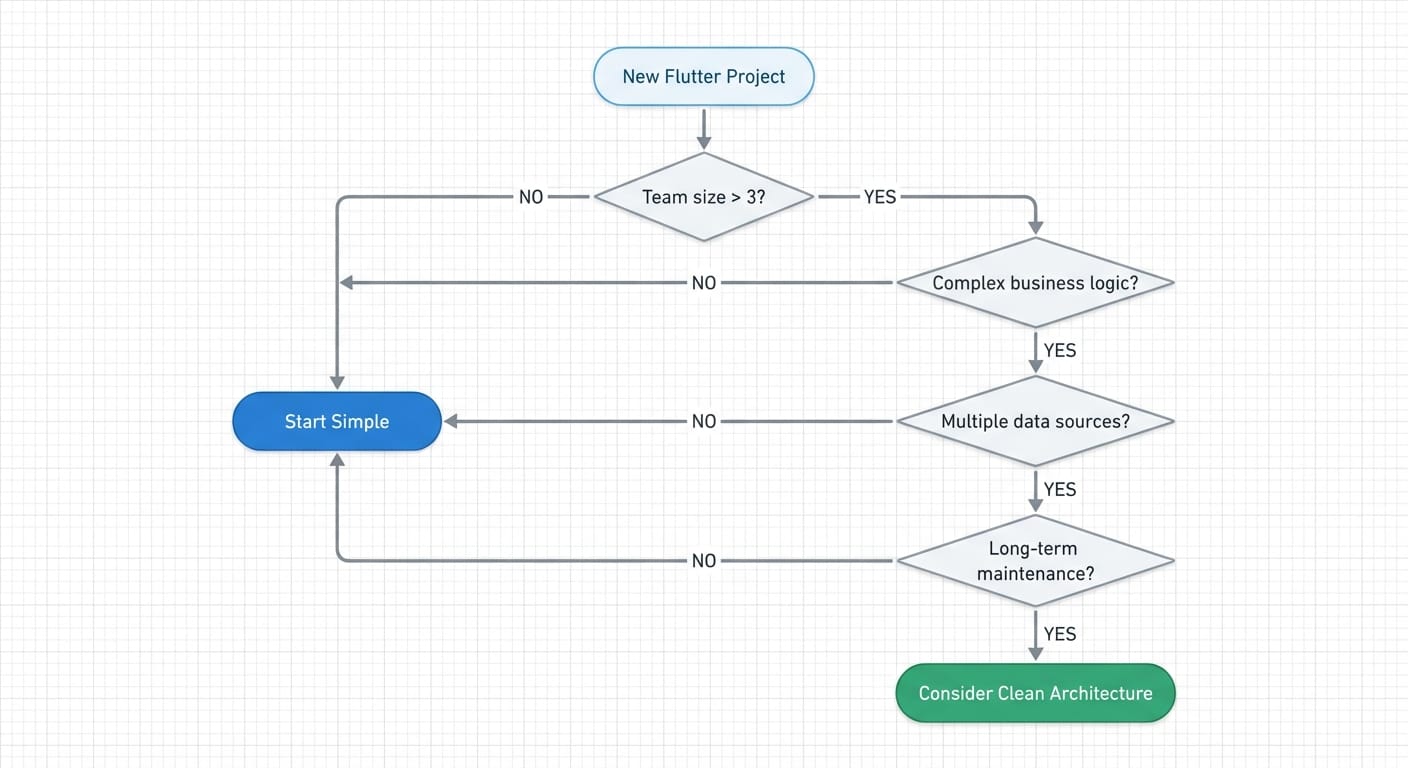
Here's the honest truth: flutter clean architecture adds overhead. More files, more boilerplate, more concepts to understand. It pays off in specific situations, but it's not always worth it.
Use clean architecture when:
- Your team has 4+ developers working on the same codebase
- Business logic is complex (rules, validations, workflows)
- You have multiple data sources (API + local DB + cache)
- The app will be maintained for 2+ years
- You need high test coverage on business logic
- Requirements change frequently (isolation helps)
Use a simpler pattern when:
- You're building an MVP to validate an idea
- Small team (1-3 developers) with good communication
- Straightforward CRUD operations
- Timeline is tight (under 8 weeks)
- Business logic is minimal
For simpler projects, we often use a feature-first structure without the strict layer separation:
lib/
├── features/
│   └── booking/
│       ├── booking_screen.dart
│       ├── booking_controller.dart
│       ├── booking_service.dart
│       └── booking_model.dart
└── shared/
    ├── api_client.dart
    └── storage.dart
Fewer files. Faster to navigate. Still organized by feature. You can always refactor toward clean architecture later if complexity grows.
Common Mistakes We've Seen (and Made)
Over-engineering from day one. We've seen teams spend 3 weeks setting up "perfect" architecture for an app that got killed after user testing. Start simpler. Add layers when you feel the pain.
Putting business logic in the wrong layer. If your BLoC is making decisions about what users can or can't do, that logic should probably be in a use case. BLoCs should orchestrate, not decide.
Skipping the repository interface. "We'll only ever use this one API." Maybe. But the interface costs almost nothing and makes testing dramatically easier.
Too many use cases. Not every action needs its own use case class. If it's just calling a repository method with no additional logic, consider whether the abstraction is helping.
At Etere Studio, we've learned that architecture decisions should follow the project, not the other way around. The goal isn't to implement a pattern perfectly — it's to build software that's easy to understand, test, and change.
Thinking about architecture for your Flutter project? We're happy to chat about what makes sense for your specific situation. Get in touch